

Nutanix NCP-US-6.5 Real Exam Questions Guaranteed Updated Dump from DumpsKing
Verified Pass NCP-US-6.5 Exam in First Attempt Guaranteed
NEW QUESTION # 22
A healthcare administrator configure a Nutanix cluster with the following requirements:
* Enable for long-term data retention of large files
* Data should be kept for two years
* Deletion or overwrite of the data must not be allowed
Which Nutanix-enabled technology should the administrator employ to satisfy these requirements?
- A. Files - Connected share
- B. Objects - Life Cycle Policy
- C. Files - Read-only share
- D. Objects - WORM with versioning
Answer: D
Explanation:
The Nutanix-enabled technology that meets these requirements is Objects - WORM with versioning. WORM (Write-Once Read-Many) is a feature that prevents anyone from modifying or deleting data in a bucket while the policy is active. WORM policies help comply with strict data retention regulations that mandate how long specific data must be stored. Versioning is a feature that keeps multiple versions of an object in a bucket whenever it is overwritten or deleted. Versioning policies help preserve previous versions of an object for backup or recovery purposes. By enabling WORM and versioning for an Objects bucket, the administrator can ensure that data is kept for two years without being deleted or overwritten. References: Nutanix Objects User Guide, page 17; Nutanix Objects Solution Guide, page 9
NEW QUESTION # 23
An administrator is tasked with performing an upgrade to the latest Objects version.
What should the administrator do prior to upgrade Objects Manager?
- A. Upgrade AOS
- B. Upgrade MSP
- C. Upgrade Lifecycle Manager
- D. Upgrade Objects service
Answer: A
Explanation:
Before upgrading Objects Manager, the administrator must upgrade AOS to the latest version. AOS is the core operating system that runs on each node in a Nutanix cluster and provides the foundation for Objects Manager and Objects service. Upgrading AOS will ensure compatibility and stability for Objects components. Reference: Nutanix Objects Administration Guide, Acropolis Operating System Upgrade Guide
NEW QUESTION # 24
What is a mandatory criterion for configuring Smart Tier?
- A. Certificate
- B. VPC name
- C. Target URL over HTTP
- D. Access and secret keys
Answer: D
Explanation:
Smart Tiering in Nutanix Files, part of Nutanix Unified Storage (NUS), allows infrequently accessed (Cold) data to be tiered to external storage, such as a public cloud (e.g., AWS S3, Azure Blob), to free up space on the primary cluster (as noted in Question 34). Configuring Smart Tiering requires setting up a connection to the external storage target, which involves providing credentials and connectivity details.
Smart Tiering requires a connection to an external storage target, such as a cloud provider. The access key and secret key are mandatory to authenticate Nutanix Files with the target (e.g., an S3 bucket), enabling secure data tiering. Without these credentials, the tiering configuration cannot be completed, making them a mandatory criterion.
Exact Extract from Nutanix Documentation:
From the Nutanix Files Administration Guide (available on the Nutanix Portal):
"To configure Smart Tiering in Nutanix Files, you must provide the access key and secret key for the external storage target (e.g., AWS S3, Azure Blob). These credentials are mandatory to authenticate with the cloud provider and enable data tiering to the specified target."
:
Nutanix Files Administration Guide, Version 4.0, Section: "Configuring Smart Tiering" (Nutanix Portal).
Nutanix Certified Professional - Unified Storage (NCP-US) Study Guide, Section: "Nutanix Files Smart Tiering".
NEW QUESTION # 25
Which metric is utilized when sizing a Files deployment based on performance requirements?
- A. Quantity of SMB shares
- B. SMB concurrent connections
- C. NFS concurrent connections
- D. Quantity of NFS exports
Answer: B
Explanation:
This metric indicates the number of active clients that are accessing the Files cluster via SMB protocol, which affects the performance of the Files cluster. NFS concurrent connections is also a relevant metric, but it is not the best answer, as it only applies to NFS protocol, not SMB. The quantity of SMB shares or NFS exports does not directly affect the performance of the Files cluster, as they are logical entities that do not consume resources. Reference: Nutanix Files Sizing Guide
NEW QUESTION # 26
An administrator needs to allow individual users to restore files and folders hosted in Files.
How can the administrator meet this requirement?
- A. Enable Self-Service Restore on the FSVMs.
- B. Enable Self-Service Restore on shares/exports.
- C. Configure a Protection Domain for the shares/exports.
- D. Configure a Protection Domain on the FSVMs.
Answer: B
Explanation:
Self-Service Restore (SSR) is a feature that allows individual users to restore files and folders hosted in Files without requiring administrator intervention. SSR can be enabled on a per-share or per-export basis, and users can access the snapshots of their data through a web portal or a Windows client application1. References:
Nutanix Files Administration Guide1
NEW QUESTION # 27
Which two prerequisites are needed when deploying Objects to a Nutanix cluster? (Choose two.)
- A. AHV IPAM is disabled on the VLAN used for Objects.
- B. Microsegmentation is enabled.
- C. Data Services IP is configured on the PI
- D. DNS is configured on the PE.
Answer: C
Explanation:
Nutanix Objects requires a Data Services IP to be configured on the Prism Infrastructure (PI) cluster, which is used to expose the S3 API endpoint for accessing buckets and objects. Nutanix Objects also requires AHV IP Address Management (IPAM) to be disabled on the VLAN used for Objects, as Objects uses its own DHCP service to assign IP addresses to the Objects VMs1. Reference: Nutanix Objects Administration Guide1
NEW QUESTION # 28
Which port is required between a CVM or Prism Central to insights,nutanix.com for Data Lens configuration?
- A. 0
- B. 1
- C. 2
- D. 3
Answer: A
Explanation:
Data Lens is a SaaS that provides file analytics and reporting, anomaly detection, audit trails, ransomware protection features, and tiering management for Nutanix Files. To configure Data Lens, one of the network requirements is to allow HTTPS (port 443) traffic between a CVM or Prism Central to insights.nutanix.com. This allows Data Lens to collect metadata and statistics from the FSVMs and display them in a graphical user interface. Reference: Nutanix Files Administration Guide, page 93; Nutanix Data Lens User Guide
NEW QUESTION # 29
Which two prerequisites are needed when deploying Objects to a Nutanix cluster? (Choose two.)
- A. AHV IPAM is disabled on the VLAN used for Objects.
- B. Microsegmentation is enabled.
- C. Data Services IP is configured on the PI
- D. DNS is configured on the PE.
Answer: C
Explanation:
Nutanix Objects requires a Data Services IP to be configured on the Prism Infrastructure (PI) cluster, which is used to expose the S3 API endpoint for accessing buckets and objects. Nutanix Objects also requires AHV IP Address Management (IPAM) to be disabled on the VLAN used for Objects, as Objects uses its own DHCP service to assign IP addresses to the Objects VMs1. References: Nutanix Objects Administration Guide1
NEW QUESTION # 30
An administrator has performed an upgrade to Files. After upgrading, the file server cannot reach the given domain name with the specified DNS server list.
Which two steps should the administrator perform to resolve the connectivity issues with the domain controller servers? (Choose two.)
- A. DNS server addresses of the domain controllers.
- B. DNS entries for the given domain name.
- C. Verify the DNS settings in Prism Element.
- D. Verify the DNS settings in Prism Central.
Answer: B,C
Explanation:
The two steps that the administrator should perform to resolve the connectivity issues with the domain controller servers are:
* Verify the DNS settings in Prism Element: DNS (Domain Name System) is a system that translates domain names into IP addresses. DNS settings are configurations that specify which DNS servers to use for resolving domain names. Verifying the DNS settings in Prism Element is a step that the administrator should perform, because it can help identify and correct any incorrect or outdated DNS server addresses or domain names that may cause connectivity issues with the domain controller servers.
* Verify the DNS entries for the given domain name: DNS entries are records that map domain names to IP addresses or other information. Verifying the DNS entries for the given domain name is another step that the administrator should perform, because it can help check and update any incorrect or outdated IP addresses or other information that may cause connectivity issues with the domain controller servers.
References: Nutanix Files Administration Guide, page 32; Nutanix Files Troubleshooting Guide
NEW QUESTION # 31
What process is initiated when a share is protected for the first time?
- A. The share is created on the recovery site with a similar configuration.
- B. A remote snapshot is created for the share.
- C. A local snapshot is created for the share.
- D. Share data movement is started to the recovery site.
Answer: C
Explanation:
Nutanix Files, part of Nutanix Unified Storage (NUS), supports data protection for shares through mechanisms like replication and snapshots. When a share is "protected for the first time," this typically refers to enabling a protection mechanism, such as a replication policy (e.g., NearSync, as seen in Question 24) or a snapshot schedule, to ensure the share's data can be recovered in case of failure.
Analysis of Options:
* Option A (Share data movement is started to the recovery site): Incorrect. While data movement to a recovery site occurs during replication (e.g., with NearSync), this is not the first step when a share is protected. Before data can be replicated, a baseline snapshot is typically created to capture the share's initial state. Data movement follows the snapshot creation, not as the first step.
* Option B (A remote snapshot is created for the share): Incorrect. A remote snapshot implies that a snapshot is created directly on the recovery site, which is not how Nutanix Files protection works initially. The first step is to create a local snapshot on the primary site, which is then replicated to the remote site as part of the protection process (e.g., via NearSync).
* Option C (The share is created on the recovery site with a similar configuration): Incorrect. While this step may occur during replication setup (e.g., the remote site's file server is configured to host a read-only copy of the share, as seen in the exhibit for Question 24), it is not the first process initiated.
The share on the recovery site is created as part of the replication process, which begins after a local snapshot is taken.
* Option D (A local snapshot is created for the share): Correct. When a share is protected for the first time (e.g., by enabling a snapshot schedule or replication policy), the initial step is to create a local snapshot of the share on the primary site. This snapshot captures the share's current state and serves as the baseline for protection mechanisms like replication or recovery. For example, in a NearSync setup, a local snapshot is taken, and then the snapshot data is replicated to the remote site.
Why Option D?
Protecting a share in Nutanix Files typically involves snapshots as the foundation for data protection. The first step is to create a local snapshot of the share on the primary site, which captures the share's data and metadata. This snapshot can then be used for local recovery (e.g., via Self-Service Restore) or replicated to a remote site for DR (e.g., via NearSync). The question focuses on the initial process, making the creation of a local snapshot the correct answer.
Exact Extract from Nutanix Documentation:
From the Nutanix Files Administration Guide (available on the Nutanix Portal):
"When a share is protected for the first time, whether through a snapshot schedule or a replication policy, the initial step is to create a local snapshot of the share on the primary site. This snapshot captures the share's current state and serves as the baseline for subsequent protection operations, such as replication to a remote site or local recovery."
:
Nutanix Files Administration Guide, Version 4.0, Section: "Data Protection for Nutanix Files Shares" (Nutanix Portal).
Nutanix Certified Professional - Unified Storage (NCP-US) Study Guide, Section: "Nutanix Files Data Protection".
NEW QUESTION # 32
An administrator has received an alert A130357 - VolumeGroupProtectionFailedOnPC with the following details:
* Block Serial Number: 16Suxxxxxxxx
* Alert Time: Thu Jan 19 2023 20:31:10 GMT-0800 (PST)
* Alert Type: VolumeGroupProtectionFailedOnPC
* Alert Message: A130357:VolumeGroupProtectionFailedOnPC
* Cluster ID: xxxxx
* Alert Body: Volume Group protection failed on PCWhich two conditions need to be addressed to allow successful protection of the Volume Group? (Choose two.)
- A. The Protection Policy applied on Volume Group has an Async snapshot schedule applied.
- B. The Protection Policy applied on Volume Group has a NearSync snapshot schedule applied.
- C. Volume Group is protected in a legacy protection domain.
- D. Volume Group is not protected in a legacy protection domain.
Answer: B,C
Explanation:
The alert A130357 - VolumeGroupProtectionFailedOnPC in a Nutanix environment indicates a failure to protect a Volume Group (VG) in a Protection Domain (PD) managed through Prism Central (PC). Nutanix Volumes, part of Nutanix Unified Storage (NUS), provides block storage via iSCSI, and Volume Groups can be protected using Protection Domains for snapshots and replication. The alert suggests that the protection process failed, likely due to incompatible configurations.
Understanding the Issue:
* Volume Group Protection: A Volume Group in Nutanix Volumes can be added to a Protection Domain in Prism Central for data protection (e.g., snapshots, replication).
* Protection Failed on PC: The failure occurred during the protection process, managed through Prism Central, indicating an issue with the Protection Domain or policy settings.
* Conditions to Address: The failure is likely due to configuration mismatches or unsupported settings in the Protection Domain or policy.
Analysis of Conditions:
* Option A (Volume Group is protected in a legacy protection domain): Correct. A "legacy protection domain" refers to an older protection mechanism in Nutanix (e.g., from earlier AOS versions) that may not be fully compatible with newer Prism Central features or Volume Group protection workflows. If the Volume Group is part of a legacy PD, the protection process may fail due to deprecated features or APIs. Addressing this involves migrating the Volume Group to a modern Protection Domain in Prism Central, ensuring compatibility.
* Option B (The Protection Policy applied on Volume Group has an Async snapshot schedule applied): Incorrect. An Async (asynchronous) snapshot schedule is a standard and supported configuration for Volume Group protection in a Protection Domain. Async schedules take snapshots at intervals (e.g., hourly, daily) and replicate them to a remote site, and this does not cause protection failures-it's a valid setup.
* Option C (The Protection Policy applied on Volume Group has a NearSync snapshot schedule applied): Correct. NearSync is a near-synchronous replication schedule (e.g., 1-minute RPO, as in Question 24) that is supported for VMs and some Nutanix Files configurations, but it is not supported for Volume Groups in a Protection Domain. If a NearSync schedule is applied to a Volume Group's Protection Policy, the protection will fail because Volume Groups only support Async schedules.
Addressing this involves changing the schedule to an Async policy, which is compatible with Volume Groups.
* Option D (Volume Group is not protected in a legacy protection domain): Incorrect. This option suggests that the Volume Group is already in a modern (non-legacy) Protection Domain, which would not cause the failure. The issue lies in specific conditions (e.g., legacy PD or incompatible schedule), so this option does not identify a condition that needs addressing.
Selected Conditions:
* A: A legacy Protection Domain can cause compatibility issues, leading to protection failures. Migrating to a modern PD in Prism Central resolves this.
* C: A NearSync schedule is not supported for Volume Groups, causing the protection to fail. Switching to an Async schedule ensures compatibility.
Why These Conditions?
* Legacy Protection Domain (A): Legacy PDs may use outdated mechanisms that are incompatible with Prism Central's modern protection workflows for Volume Groups, causing failures.
* NearSync Schedule (C): Volume Groups in a Protection Domain only support Async snapshot schedules. A NearSync schedule, designed for low-RPO replication, is not supported and will cause the protection process to fail.
Exact Extract from Nutanix Documentation:
From the Nutanix Prism Alerts Reference Guide (available on the Nutanix Portal):
"Alert A130357 - VolumeGroupProtectionFailedOnPC: This alert is triggered when Volume Group protection fails in a Protection Domain managed through Prism Central. Common causes include:
* The Volume Group is protected in a legacy protection domain, which is not fully compatible with modern Prism Central workflows. Migrate the Volume Group to a modern Protection Domain.
* The Protection Policy applied to the Volume Group has a NearSync snapshot schedule, which is not supported for Volume Groups. Change the schedule to an Async policy to allow successful protection."
:
Nutanix Prism Alerts Reference Guide, Version 6.0, Section: "Alert A130357 - VolumeGroupProtectionFailedOnPC" (Nutanix Portal).
Nutanix Volumes Administration Guide, Version 6.0, Section: "Protecting Volume Groups with Protection Domains" (Nutanix Portal).
Nutanix Certified Professional - Unified Storage (NCP-US) Study Guide, Section: "Nutanix Volumes Data Protection".
NEW QUESTION # 33
Which tool allows a report on file sizes to be automatically generated on a weekly basis?
- A. File Analytics
- B. Files Console via Prism Element
- C. Files view in Prism Central
- D. Data Lens
Answer: D
Explanation:
Data Lens is a feature that provides insights into the data stored in Files, such as file types, sizes, owners, permissions, and access patterns. Data Lens allows administrators to create reports on various aspects of their data and schedule them to run automatically on a weekly basis. References: Nutanix Data Lens Administration Guide
NEW QUESTION # 34
Refer to the exhibit.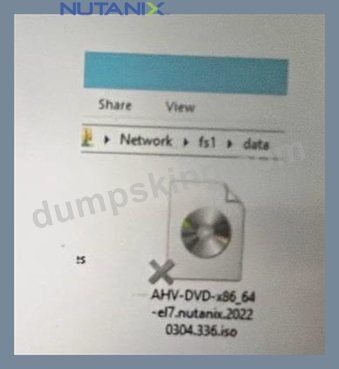
What does the ''X'' represent on the icon?
- A. Corrupt ISO
- B. Distributed shared file
- C. Share Disconnected File
- D. Tiered File
Answer: B
Explanation:
The "X" on the icon represents a distributed shared file, which is a file that belongs to a distributed share or export. A distributed share or export is a type of SMB share or NFS export that distributes the hosting of top-level directories across multiple FSVMs. The "X" indicates that the file is not hosted by the current FSVM, but by another FSVM in the cluster. The "X" also helps to identify which files are eligible for migration when using the Nutanix Files Migration Tool. Reference: Nutanix Files Administration Guide, page 34; Nutanix Files Migration Tool User Guide, page 10
NEW QUESTION # 35
What are the limitations for enabling Self-Service Restore (SSR) in a File Server? (Choose two.)
- A. SSR is not supported at the root of distributed shares or exports.
- B. SSR does not support SMB shares.
- C. SSR for SMB does not restore streams or attributes in directories.
- D. SSR does not support NFS shares.
Answer: A,D
Explanation:
Self-Service Restore (SSR) in Nutanix Files, part of Nutanix Unified Storage (NUS), allows users to recover previous versions of files without administrator intervention. SSR is primarily designed for SMB shares, and it has specific limitations that restrict its functionality in certain scenarios.
Analysis of Options:
* Option A (SSR is not supported at the root of distributed shares or exports): Correct. According to Nutanix documentation, SSR cannot be enabled at the root level of distributed shares or exports.
Distributed shares in Nutanix Files are those that span multiple FSVMs for scalability, and the root of such shares does not support SSR due to the complexity of managing snapshots at that level.
* Option B (SSR for SMB does not restore streams or attributes in directories): Incorrect. While SSR has limitations, this specific restriction is not documented in Nutanix Files documentation. SSR for SMB does restore file data and metadata, including attributes, though it may not support all advanced features like alternate data streams in some cases. However, this is not a primary limitation highlighted in the official documentation.
* Option C (SSR does not support NFS shares): Correct. SSR is designed for SMB shares and relies on Windows Shadow Copy (VSS) integration to provide Previous Versions functionality. NFS shares do not support SSR, as NFS lacks a native equivalent to VSS for user-driven restores.
* Option D (SSR does not support SMB shares): Incorrect. This is the opposite of the truth-SSR is specifically designed for SMB shares and is not supported for NFS shares, as noted in option C.
Selected Limitations:
* A: SSR's inability to function at the root of distributed shares or exports is a documented limitation, as it affects how snapshots are managed in distributed environments.
* C: SSR's lack of support for NFS shares is a fundamental limitation, as SSR relies on SMB-specific features.
Exact Extract from Nutanix Documentation:
From the Nutanix Files Administration Guide (available on the Nutanix Portal):
"Self-Service Restore (SSR) is supported only for SMB shares and is not available for NFS shares or exports.
Additionally, SSR cannot be enabled at the root of distributed shares or exports due to limitations in snapshot management at the root level."
:
Nutanix Files Administration Guide, Version 4.0, Section: "Self-Service Restore Limitations" (Nutanix Portal).
Nutanix Certified Professional - Unified Storage (NCP-US) Study Guide, Section: "Nutanix Files Self- Service Restore".
NEW QUESTION # 36
An administrator is leveraging Smart DR to protect a Files share. There is a requirement that in the event of a failure, client redirection should be seamless. How should the administrator satisfy this requirement?
- A. Activate protected shares on the recovery site.
- B. Enable redirection in the protection policy.
- C. Update the AD and DNS entries.
- D. Create a reverse replication policy.
Answer: C
Explanation:
Smart DR in Nutanix Files, part of Nutanix Unified Storage (NUS), automates disaster recovery (DR) by replicating shares between primary and recovery file servers (e.g., using NearSync, as in Question 24). The administrator is using Smart DR to protect a Files share and needs seamless client redirection in the event of a failure, meaning clients should automatically connect to the recovery site without manual intervention.
Understanding the Requirement:
* Smart DR Protection: Smart DR replicates the Files share from the primary site to the recovery site, typically with the primary site in read-write (RW) mode and the recovery site in read-only (RO) mode (as seen in the exhibit for Question 24).
* Seamless Client Redirection: In a failure scenario (e.g., primary site down), clients should automatically redirect to the recovery site without needing to reconfigure their connections (e.g., changing the share path or IP address).
* Files Share Context: Clients typically access Files shares via SMB or NFS, using a hostname or IP address (e.g., \fileserver\share for SMB or fileserver:/share for NFS).
Analysis of Options:
* Option A (Create a reverse replication policy): Incorrect. A reverse replication policy would replicate data from the recovery site back to the primary site, typically used after failover to prepare for failback. This does not address seamless client redirection during a failure-it focuses on data replication direction, not client connectivity.
* Option B (Enable redirection in the protection policy): Incorrect. Smart DR protection policies define replication settings (e.g., RPO, schedule), but there is no "redirection" setting in the policy itself.
Client redirection in Nutanix Files DR scenarios is managed through external mechanisms like DNS, not within the protection policy.
* Option C (Update the AD and DNS entries): Correct. Seamless client redirection in Nutanix Files DR scenarios requires that clients can automatically connect to the recovery site without changing their share paths. This is achieved by updating Active Directory (AD) and DNS entries:
* DNS Update: The hostname of the file server (e.g., fileserver.company.com) should resolve to the IP address of the primary site's File Server under normal conditions. During a failure, DNS is updated to point to the recovery site's File Server IP address (e.g., the Client network IP of the recovery FSVMs). This ensures clients automatically connect to the recovery site without changing the share path (e.g., \fileserver.company.com\share continues to work).
* AD Update: For SMB shares, the Service Principal Name (SPN) in AD must be updated to reflect the recovery site's File Server, ensuring Kerberos authentication works seamlessly after failover.This approach ensures clients are redirected without manual intervention, meeting the
"seamless" requirement.
* Option D (Activate protected shares on the recovery site): Incorrect. Activating protected shares on the recovery site (e.g., making them RW during failover) is a necessary step for failover, but it does not ensure seamless client redirection. Without updating DNS/AD, clients will not know to connect to the recovery site-they will continue trying to access the primary site's IP address, requiring manual reconfiguration (e.g., changing the share path), which is not seamless.
Why Option C?
Seamless client redirection in a Nutanix Files DR scenario requires that clients can connect to the recovery site without changing their share paths. Updating AD and DNS entries ensures that the file server's hostname resolves to the recovery site's IP address after failover, and AD authentication (e.g., Kerberos for SMB) continues to work. This allows clients to automatically redirect to the recovery site without manual intervention, fulfilling the requirement for seamlessness.
Exact Extract from Nutanix Documentation:
From the Nutanix Files Administration Guide (available on the Nutanix Portal):
"To ensure seamless client redirection during a Smart DR failover, update Active Directory (AD) and DNS entries. Configure DNS to resolve the file server's hostname to the recovery site's File Server IP address after failover, and update the Service Principal Name (SPN) in AD to ensure Kerberos authentication works for SMB clients. This allows clients to automatically connect to the recovery site without manual reconfiguration."
:
Nutanix Files Administration Guide, Version 4.0, Section: "Smart DR Failover and Client Redirection" (Nutanix Portal).
Nutanix Certified Professional - Unified Storage (NCP-US) Study Guide, Section: "Nutanix Files Disaster Recovery".
NEW QUESTION # 37
Which tool allows a report on file sizes to be automatically generated on a weekly basis?
- A. File Analytics
- B. Files Console via Prism Element
- C. Files view in Prism Central
- D. Data Lens
Answer: D
Explanation:
Data Lens is a feature that provides insights into the data stored in Files, such as file types, sizes, owners, permissions, and access patterns. Data Lens allows administrators to create reports on various aspects of their data and schedule them to run automatically on a weekly basis. Reference: Nutanix Data Lens Administration Guide
NEW QUESTION # 38
An administrator has received an alert A130358 - ConsistencyGroupWithStaleEntities with the following details:
* Block Serial Number: leswxxxxxxxx
* Alert Time: Thu Jan 19 2023 21:56:10 GMT-0800 (PST)
* Alert Type: ConsistencyGroupWithStaleEntities
* Alert Message: A130358:ConsistencyGroupWithStaleEntities
* Cluster ID: xxxxx
* Alert Body: No alert body availableWhich scenario is causing the alert and needs to be addressed to allow the entities to be protected?
- A. The logical timestamp for one or more of the Volume Groups is not consistent between clusters.
- B. One or more VMs or Volume Groups belonging to the Consistency Group contains stale metadata.
- C. One or more VMs or Volume Groups belonging to the Consistency Group may have been deleted.
- D. One or more VMs or Volume Groups belonging to the Consistency Group is part of multiple Recovery Plans configured with a Witness.
Answer: B
Explanation:
The alert A130358 - ConsistencyGroupWithStaleEntities in a Nutanix environment indicates an issue with a Consistency Group, which is used in Nutanix data protection to ensure that related entities (e.g., VMs, Volume Groups) are protected together in a consistent state. This alert specifically points to "stale entities," meaning there is a problem with the entities within the Consistency Group that prevents proper protection.
Analysis of Options:
* Option A (One or more VMs or Volume Groups belonging to the Consistency Group contains stale metadata): Correct. The "ConsistencyGroupWithStaleEntities" alert is triggered when entities (e.
g., VMs or Volume Groups) in a Consistency Group have stale metadata, meaning their metadata is outdated or corrupted. This can happen due to synchronization issues, failed operations, or manual changes that leave the metadata inconsistent with the actual state of the entity. This prevents the Consistency Group from being protected properly, as the system cannot ensure consistency.
* Option B (One or more VMs or Volume Groups belonging to the Consistency Group may have been deleted): Incorrect. If an entity in a Consistency Group is deleted, a different alert would typically be triggered (e.g., related to a missing entity). The "StaleEntities" alert specifically refers to metadata issues, not deletion. However, deletion could indirectly cause metadata staleness if the deletion was not properly synchronized, but this is not the primary cause described by the alert.
* Option C (The logical timestamp for one or more of the Volume Groups is not consistent between clusters): Incorrect. Inconsistent logical timestamps between clusters would typically trigger a different alert related to replication or synchronization (e.g., in Metro Availability or NearSync scenarios). The
"StaleEntities" alert is specific to metadata issues within the Consistency Group on the local cluster, not a cross-cluster timestamp issue.
* Option D (One or more VMs or Volume Groups belonging to the Consistency Group is part of multiple Recovery Plans configured with a Witness): Incorrect. Being part of multiple Recovery Plans or using a Witness (e.g., in Metro Availability) does not directly cause a "StaleEntities" alert.
This scenario might cause other issues (e.g., conflicts in recovery operations), but it is not related to stale metadata within a Consistency Group.
Why Option A?
The "ConsistencyGroupWithStaleEntities" alert explicitly indicates that the entities in the Consistency Group have stale metadata, which must be resolved to allow proper protection. The administrator would need to investigate the affected VMs or Volume Groups, clear the stale metadata (e.g., by refreshing the Consistency Group or removing/re-adding the entity), and ensure synchronization with the cluster's state.
Exact Extract from Nutanix Documentation:
From the Nutanix Prism Alerts Reference Guide (available on the Nutanix Portal):
"Alert A130358 - ConsistencyGroupWithStaleEntities: This alert is triggered when one or more entities (e.g., VMs or Volume Groups) in a Consistency Group have stale metadata, preventing the group from being protected consistently. Stale metadata can occur due to failed operations, synchronization issues, or manual changes. To resolve, identify the affected entities, clear the stale metadata, and ensure the Consistency Group is properly synchronized."
:
Nutanix Prism Alerts Reference Guide, Version 6.0, Section: "Alert A130358 - ConsistencyGroupWithStaleEntities" (Nutanix Portal).
Nutanix Certified Professional - Unified Storage (NCP-US) Study Guide, Section: "Nutanix Data Protection Troubleshooting".
NEW QUESTION # 39
An administrator is attempting to create a share that will provide user access via SMB and NFS. However, the Enable multiprosotocol accounts for NFS clients settings is not available.
What would cause this issue?
- A. NFS configured to use unmanaged authentication.
- B. The connection to Active Directory has not been configured.
- C. The incorrect Files license has been applied.
- D. The file server instance was only configured with SMB.
Answer: B
Explanation:
The cause of this issue is that the connection to Active Directory has not been configured. Active Directory is a service that provides centralized authentication and authorization for Windows-based clients and servers. To create a share that will provide user access via SMB and NFS, the administrator must first configure the connection to Active Directory in the Files Console. This will allow the administrator to enable multiprotocol accounts for NFS clients, which are accounts that map NFS users to SMB users and groups for consistent access control across both protocols. Reference: Nutanix Files Administration Guide, page 32; Nutanix Files Solution Guide, page 6
NEW QUESTION # 40
......
Nutanix NCP-US-6.5 Exam Syllabus Topics:
| Topic | Details |
|---|---|
| Topic 1 |
|
| Topic 2 |
|
| Topic 3 |
|
| Topic 4 |
|
| Topic 5 |
|
| Topic 6 |
|
| Topic 7 |
|
Download Real Nutanix NCP-US-6.5 Exam Dumps Test Engine Exam Questions: https://dumpstorrent.dumpsking.com/NCP-US-6.5-testking-dumps.html
